

_800_x_600.webp "PDS-1/10G")
The PDS-1/10G Portable Delay Simulator allows network impairments for bandwidth restriction, latency, jitter
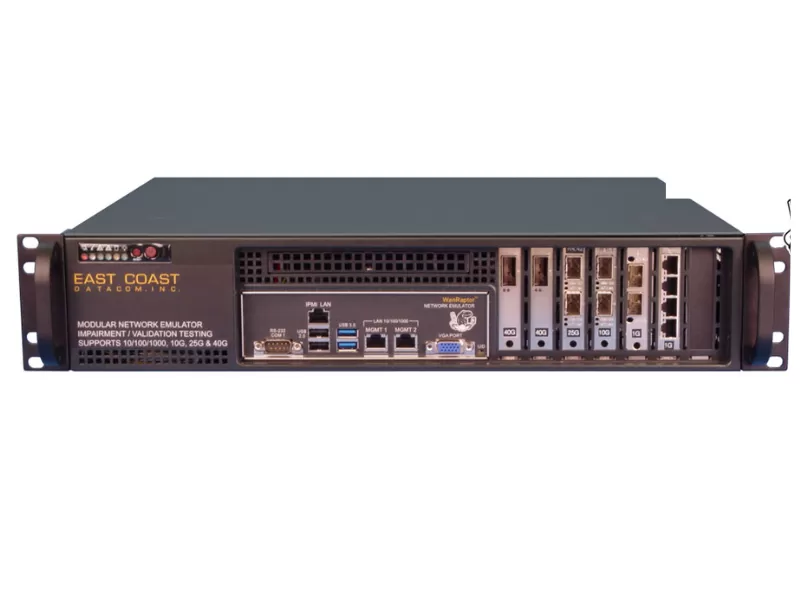
The WanRaptor™ is capable of any port LAN to LAN emulation or create up to ten VLAN emulations within a single LAN, each with its own impairments.
_800_x_600.webp "Net.Storm")
NetStorm generates those perturbances typical of IP and Carrier Ethernet to test applications, devices and protocols that should be tolerant with packet
A Network Emulator is a network testing solution used to reproduce real-world network conditions in a controlled test environment. It enables network engineers, developers, QA teams and system integrators to introduce conditions such as latency, jitter, packet loss, bandwidth limitations and packet reordering before deploying applications, devices or network infrastructure.
Khushi Communications offers network emulation solutions for WAN testing, network performance testing, application validation, network equipment testing, VoIP testing, video/IPTV testing and laboratory environments. Our solutions include the PDS-1/10G Portable Delay Simulator, WanRaptor™ and Net.Storm for controlled network impairment testing.
Whether you need a WAN Emulator, Network Latency Emulator, portable network impairment solution or multiport network emulator, our solutions help you reproduce realistic network conditions and evaluate how networks, devices and applications perform under controlled stress.
A network emulator is a hardware or software-based testing tool that introduces controlled network conditions into a real network connection or test environment. Instead of waiting for poor network conditions to occur in a live environment, engineers can reproduce those conditions in a laboratory or development environment.
A Network Emulator can be used to simulate network characteristics such as:
This allows teams to test how applications, network devices and communication systems behave when network conditions are not ideal.
Network emulation is particularly useful for WAN environments because long-distance connections can introduce latency, congestion, packet loss and other conditions that are difficult to reproduce consistently in a laboratory. Controlled emulation makes these conditions repeatable, allowing engineers to compare results across different test scenarios.
A network emulator helps reproduce specific network impairments so that engineers can evaluate application and device performance under realistic conditions.
Latency is the time required for packets to travel between network endpoints. A Network Latency Emulator allows engineers to introduce controlled delay into a test connection.
Latency testing is useful for applications and systems that depend on timely communication, including cloud applications, enterprise networks, VoIP, video services and distributed systems.
Jitter refers to variation in packet delay. Consistent latency and variable latency can produce different application behavior, especially for real-time traffic.
A network emulator can introduce controlled jitter so that engineers can evaluate application performance under changing delay conditions.
Packet loss occurs when packets fail to reach their intended destination. Even small amounts of packet loss can affect application performance and network reliability.
Network emulation can introduce controlled packet loss to help engineers evaluate how applications, protocols and network devices respond to impaired connections.
A network emulator can restrict available bandwidth to reproduce slower network links or congested network conditions.
Bandwidth testing can help determine whether applications and network equipment continue to perform correctly when available throughput is limited.
Packets do not always arrive in the same order in which they were transmitted. Packet reordering can occur because of different paths, congestion and network behavior.
A Network Emulator can reproduce packet reordering to help test protocol and application behavior under these conditions.
Some network testing scenarios require duplicate or corrupted packets. These conditions can be introduced in a controlled environment to evaluate the resilience of applications, protocols and network devices.
Khushi Communications provides network emulation solutions designed for different network testing requirements, from portable laboratory testing to multiport network impairment scenarios.
The PDS-1/10G Portable Delay Simulator is a compact network impairment solution for 1G and 10G network testing.
It can simulate bandwidth limitation, latency, jitter, packet loss and packet reordering at link speeds up to 10GbE. The system supports real-time adjustments and provides a statistics screen with a resettable packet counter.
Its compact design makes the PDS-1/10G suitable for desk and bench testing, demonstrations, product development and laboratory environments. It can also be wall mounted or installed in a 1U rackmount configuration.
The PDS-1/10G can be used for:
Internal link anchor: PDS-1/10G 10G Multiport WAN Emulator
The WanRaptor™ provides flexible LAN-to-LAN network emulation and can create multiple VLAN emulations within a LAN, with individual impairments for different test scenarios.
It is designed for controlled network impairment testing and can be used when engineers need to reproduce network conditions across different interfaces and test configurations.
WanRaptor™ is suitable for network engineers and test teams working on:
Net.Storm is designed to generate network perturbations associated with IP and Carrier Ethernet environments.
It can be used to test applications, devices and protocols that need to operate correctly under impaired network conditions.
This type of testing helps development and validation teams understand how systems respond when network performance changes.
Network emulators are used across development, testing, validation and network performance analysis.
A WAN Emulator can reproduce conditions that may occur across wide-area network connections. Engineers can introduce latency, jitter, packet loss and bandwidth restrictions to evaluate network performance before deployment.
SD-WAN solutions need to operate across network connections with different performance characteristics. Network emulation can help teams test how SD-WAN devices and policies respond to latency, loss, jitter and bandwidth changes.
Routers, switches, firewalls and other network equipment can be tested under controlled impairment conditions.
Testing under realistic network conditions can reveal performance or resilience issues that may not appear on a clean laboratory connection.
Applications may behave differently when latency increases, bandwidth decreases or packets are lost.
A network emulator enables development and QA teams to introduce controlled impairments and evaluate application performance before deployment.
Voice applications are sensitive to latency, jitter and packet loss. Network emulation allows teams to reproduce these conditions and evaluate voice performance under controlled network scenarios.
Video applications can be affected by bandwidth limitations, latency and packet loss. Network emulation can help test application behavior under different network conditions.
Before deploying a network or application into a production environment, engineers can use network emulation to validate performance under expected and worst-case network conditions.
A network simulator generally models network behavior without requiring the same physical network path or devices used in a live test environment.
A network emulator, on the other hand, can be placed in a real test path and introduce controlled network impairments into actual traffic.
For example, engineers can connect two test devices through an emulator and introduce latency, packet loss, jitter or bandwidth restrictions while observing how the real devices and applications behave.
Both approaches can be useful, but network emulation is particularly valuable when testing actual hardware, applications and protocols under repeatable real-world network conditions.
Selecting a Network Emulator depends on the network environment, interface speed, impairment requirements and test objectives.
Determine the Ethernet speed required for your testing environment. Depending on the application, you may need 1G, 10G, 25G, 40G or higher-speed interfaces.
Check whether the emulator supports the conditions required for your testing, such as:
Single-link testing may require a different configuration from multiport or multi-VLAN environments. Choose a solution that matches the number of interfaces and network scenarios you need to test.
Real-time statistics, configurable impairment parameters and easy test control can make repeated testing easier and more consistent.
For field demonstrations, customer testing and laboratory work, a portable network emulator can be useful. For larger test environments, a rackmount or multiport solution may be more appropriate.
The right solution depends on whether you are testing WAN links, SD-WAN, VoIP, video, network devices, applications, protocols or general network performance.
Khushi Communications is a supplier of network testing and network emulation solutions in India. Our Network Emulator portfolio is designed for organizations that need to reproduce controlled network impairments for development, validation, troubleshooting and performance testing.
Our solutions support use cases involving WAN emulation, network latency testing, jitter testing, packet loss testing, bandwidth limitation and network performance validation.
We help customers select a network emulator according to their interface speed, number of ports, required impairments, application and testing environment.
For organizations looking for a Network Emulator Supplier in India, our team can provide product information, technical guidance and assistance in selecting a suitable network emulation solution.
Testing applications and network devices only under ideal network conditions may not reveal how they behave in real-world environments.
A network emulator allows teams to introduce controlled impairments before deployment. This provides several benefits:
By creating repeatable test conditions, engineers can investigate how a system behaves when network quality changes.
A Network Emulator is a testing solution that introduces controlled network conditions such as latency, jitter, packet loss, bandwidth limitation and packet reordering into a test environment. It helps engineers evaluate applications, devices and networks under realistic conditions.
A WAN Emulator is used to reproduce characteristics of wide-area network connections in a controlled environment. It can be used to introduce conditions such as latency, jitter, packet loss and throughput limitations for WAN performance testing.
A Network Latency Emulator is a network testing solution used to introduce controlled packet delay into a network connection. It helps engineers evaluate application and device behavior when communication between endpoints experiences additional latency.
Depending on the solution, network emulators can simulate conditions such as latency, jitter, packet loss, bandwidth limitations, packet reordering, packet duplication and other network impairments.
A Network Emulator allows engineers to reproduce realistic and repeatable network conditions before deploying an application, device or network infrastructure. This can help identify performance and resilience issues during development and validation.
A simulator generally models network behavior in a virtual or modeled environment. An emulator can introduce controlled conditions into actual network traffic and physical test environments. The two approaches can be complementary.
Yes. Network emulation can be used to reproduce WAN conditions such as latency, jitter, packet loss and bandwidth limitations when evaluating SD-WAN devices, policies and application performance.
Consider your required interface speed, number of ports, network impairments, traffic type, application, portability requirements and monitoring capabilities. The right solution should match your test environment and performance requirements.
Khushi Communications provides network emulation solutions in India, including PDS-1/10G, WanRaptor™ and Net.Storm. Contact our team to discuss your network testing requirements and identify a suitable solution.
Choose the right solution for your network testing and validation requirements.
Explore PDS-1/10G Multiport WAN Emulator →
Explore WanRaptor™ Network Emulator →
Explore Net.Storm Network Impairment Emulator →
Contact Khushi Communications for Network Emulator Requirements →
 Whatsapp Us